How a voice agent writes to Notion — system design & call flow
A phone call turns into a database row with no human in the middle. This is the full architecture: the live Vapi call path through a custom tool and a PHP bridge, the parallel Hermes + Notion MCP agent path, and the API rules that decide whether an implementation works or silently fails.
- Why a voice assistant cannot call the Notion API directly, and what replaces that.
- The exact tool-call payloads passed between Vapi and your endpoint.
- How a second, independent path (Hermes Agent + Notion MCP) reaches the same workspace.
- The five Notion API rules that break naive implementations.
The one architectural fact
A Vapi assistant cannot call the Notion API itself. It has no Notion credentials, no Notion SDK, and no general-purpose HTTP tool you should hand a workspace token to. What it has is a custom function tool whose server.url points at an endpoint you control.
So the assistant makes a phone-call-shaped request: it POSTs a tool-calls webhook to your URL, your endpoint does the privileged write, and your endpoint hands back a result the assistant reads aloud. Everything else in this design follows from that single constraint — the endpoint is the trust boundary, and it is the only component holding the Notion token.
Lane A — the live call path
Caller → Vapi → tool → bridge → Notion
- Caller dials the number attached to a Vapi phone-number resource. No app, no login, no menu tree.
- The assistant answers. Speech-to-text feeds the model, which decides what to ask and when it has enough to book. Voice output is generated per turn.
- The assistant calls the tool. Once it has the details, it emits a
functiontool call — namebookAppointment, arguments carrying date, time, name, phone, job description. - Vapi POSTs the webhook to the tool's
server.urlwith an auth header. That URL is your endpoint, running as a small PHP script behind nginx → Apache + php-fpm. - The bridge validates and writes. It checks the header token, normalises the arguments (which may arrive as an object or a JSON string), then creates the Notion page with
POST /v1/pages, parented to the bookings database. - The bridge answers, the assistant speaks. The response carries one result per tool call, keyed by
toolCallId; the model turns it into "you're booked for Tuesday at eleven".
Two deployment details matter more than they look. First, the token and webhook secret live in a directory outside the document root, readable only by the site user — never in the script itself. Second, the endpoint must be idempotent enough for a retry: a duplicate webhook should not create a second booking for the same caller and slot.
The tool-call protocol
What Vapi sends to server.url:
{
  "message": {
    "type": "tool-calls",
    "toolCallList": [
      { "id": "call_1", "type": "function",
        "function": { "name": "bookAppointment",
                      "arguments": { "date": "2026-11-03", "time": "11:00" } } }
    ]
  }
}
arguments may arrive as an object or as a JSON-encoded string — handle both. Older payloads may use toolWithToolCallList, where each item wraps {function, toolCall}; treat it as an alias, not a separate code path.
What your endpoint must return:
{
  "results": [
    { "name": "bookAppointment",
      "toolCallId": "call_1",
      "result": "{\"ok\":true,\"booking\":\"2026-11-03 11:00\"}" }
  ]
}
The result is a JSON-encoded string, not an object. Return it that way and the assistant can read it; return a raw object and the tool call is reported as failed even though the write succeeded.
server.url and the assistant carries a top-level server.url pointing at the same place, Vapi delivers the tool call twice and you book twice. Set it only on the tool. Likewise, tools belong in model.tools — an assistant.tools block is not read.Lane B — the agent and build path
Hermes Agent → Notion MCP server → same API
- Hermes runs a local MCP server as a child process over stdio:
@notionhq/notion-mcp-server, launched by the agent runtime. - The token is mapped at boot — the secret store's
NOTION_API_KEYis handed to the server asNOTION_TOKEN. No token in the config file, no token in chat. - Typed tools replace hand-rolled HTTP: search, retrieve page markdown, create page, patch page, query data source, append blocks — roughly two dozen calls.
- The same databases are reachable because the integration is shared with them, so schema work, seeding and verification happen without touching the phone flow.
Keeping both paths in the design is not redundancy — it is what makes the live path debuggable. When a booking fails at 2 a.m., the agent can query the same database and prove whether the row exists, was skipped, or was written with the wrong property shape.
The full system diagram
Both lanes on one canvas: voice platform in amber, backend in green, Notion in violet, secrets in rose. Lane A is the top half; lane B is the bottom half; the Notion API gateway in the middle is shared by both.
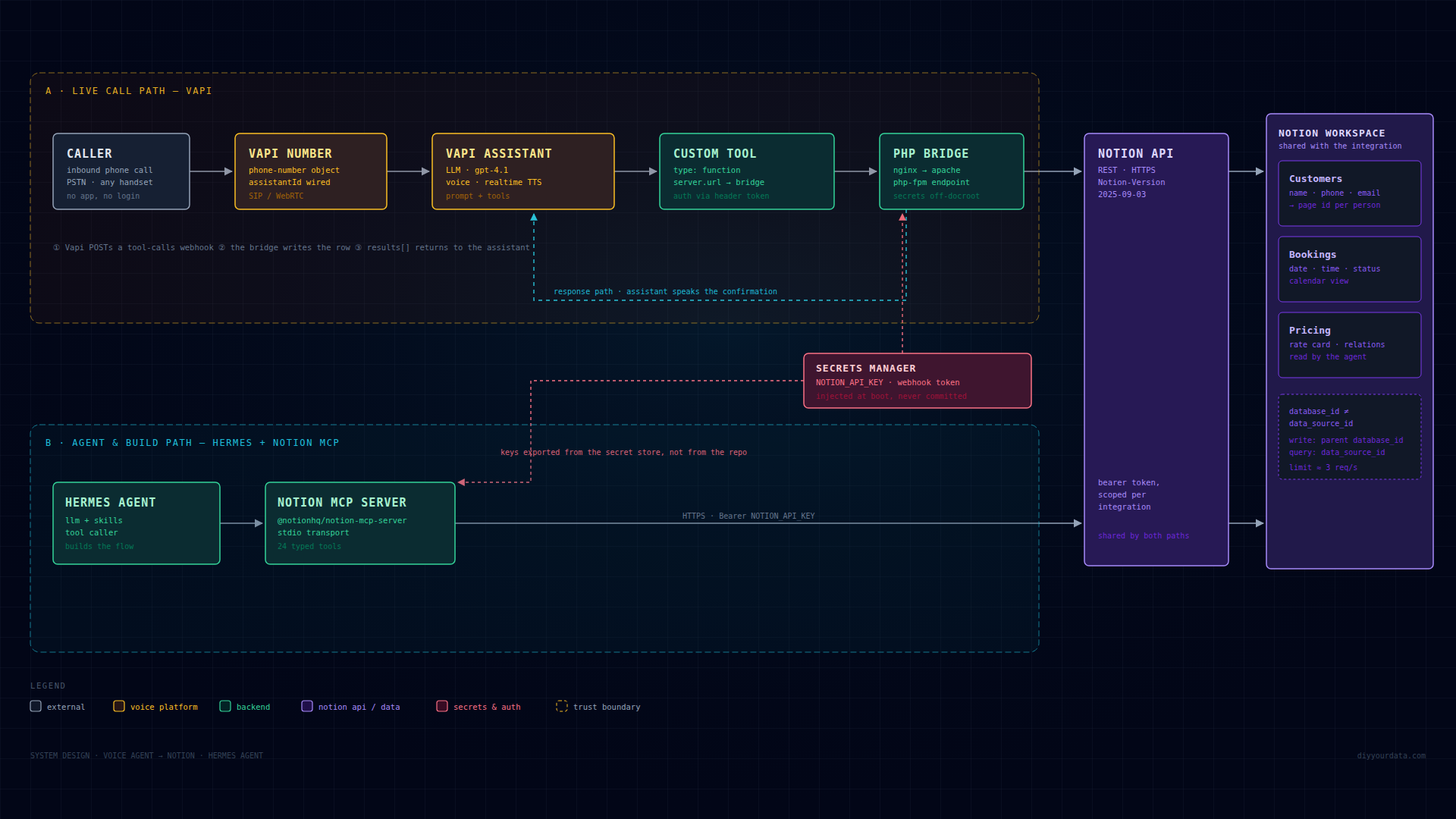
On a phone the diagram scrolls sideways, or open it full size.
Notion API rules that break implementations
| Rule | Why it bites |
|---|---|
Notion-Version: 2025-09-03 on every raw request | Omitting it returns version-mismatch errors, or older behaviour on legacy integrations. The MCP server and CLI set it for you; hand-written curl does not. |
Write with database_id, query with data_source_id | Databases now expose data sources. POST /v1/pages wants the database id; POST /v1/data_sources/{id}/query wants the data-source id. They are different UUIDs; the create response echoes the one you need. |
Property schema goes in initial_data_source.properties | A top-level properties key on database create is rejected outright. |
| Database properties are create-time only | You cannot add a property by PATCHing a database. Adding a column means a new database and a migration. |
Append blocks is PATCH /v1/blocks/{id}/children | POST returns a method error. Calendar view date_property_id additionally wants the url-encoded property id, not the name. |
| ~3 requests/second per integration | Shared by the bridge, the MCP server and any CLI work. Bursts 429; batch reads and back off. |
Failure modes and what they actually mean
| Symptom | Real cause |
|---|---|
Every call returns 404 object_not_found | The page or database was never shared with the integration. A 404 on Notion almost always means "not shared", not "missing". |
| Reads work, writes return 403 | The integration lacks Insert or Update content capability. |
| Booking saved but the caller heard a failure | result was returned as an object instead of a JSON-encoded string, or the header token check rejected the retry. |
| Two identical bookings | Tool-level and assistant-level server.url both set, or no idempotency key on the webhook. |
| Tool call times out but the row exists | The endpoint did the write and then stalled past the tool's timeoutSeconds. Keep the write path fast; move slow work after the response. |
| Nothing in Notion, no error anywhere | The assistant never fired the tool — usually a description that does not tell it when to call, or required parameters it cannot collect. |
The 20-second intro
A short, deliberately silent intro built from this same design — no voice-over and no music, so narration sits on top of it. Hook, the wire, the diagram assembling itself, outro.
1920×1080 · 30 fps · 20 s · silent · 2.3 MB